
Importing a million products from S3 into Laravel: what six hours taught us
How we got a six-hour import down to three, and what it took to get there

First time we ran this import, we kicked it off at 9 am, and it was still chugging away when we packed up for the day. Six hours. And that wasn’t a bad run; that was just what it did, every time, like clockwork.
The dataset was diamond and jewelry inventory for a client, a bit over a million SKUs, each one carrying carat weight, cut, color, clarity, dimensions, pricing tiers, image references. Sitting on S3 as one big CSV, and it needed to land in the product database with an admin panel sitting on top of it for search and filtering.
Do the math on that, and it’s not great. Six hours means the catalog is out of date for a quarter of the day, every day. Supplier bumps a price at 8 am, nobody sees it reflected until the next morning at the earliest. We knew that wasn’t going to fly long term, so we sat down and actually fixed it. Here’s the whole story, warts and all.
Quick vocabulary check before we get into it
Skip this bit if queues and chunking are already old news to you.
Chunking just means splitting a huge dataset into smaller batches instead of trying to process the whole thing as one unit. “Do a thousand rows, a thousand times” instead of “do a million rows at once.” Smaller pieces are way easier to retry when something goes wrong, and they parallelize nicely.
A queue job is a piece of work you hand off to be done later, or by a different process altogether, instead of making whatever kicked it off just sit there and wait. Dispatch it, move on; the actual work happens somewhere else.
Streaming means reading a file as it comes in, bit by bit, rather than waiting for the whole thing to land on disk or in memory first. Big difference between “start on row one while row 999,999 is still downloading” and “wait for the entire file, then start.”
Upsert is one database statement that inserts a row if it’s new and updates it if it already exists, all in a single round trip. The alternative, checking first with a SELECT and then deciding whether to INSERT or UPDATE, is two or three trips doing the same job worse.
Turning indexes off during a bulk write does what it says: you temporarily stop MySQL from maintaining every index on every row as it comes in, then flip it back on and rebuild once the big write is done. Only worth doing for genuinely huge batch jobs, not your everyday write.
What we started with
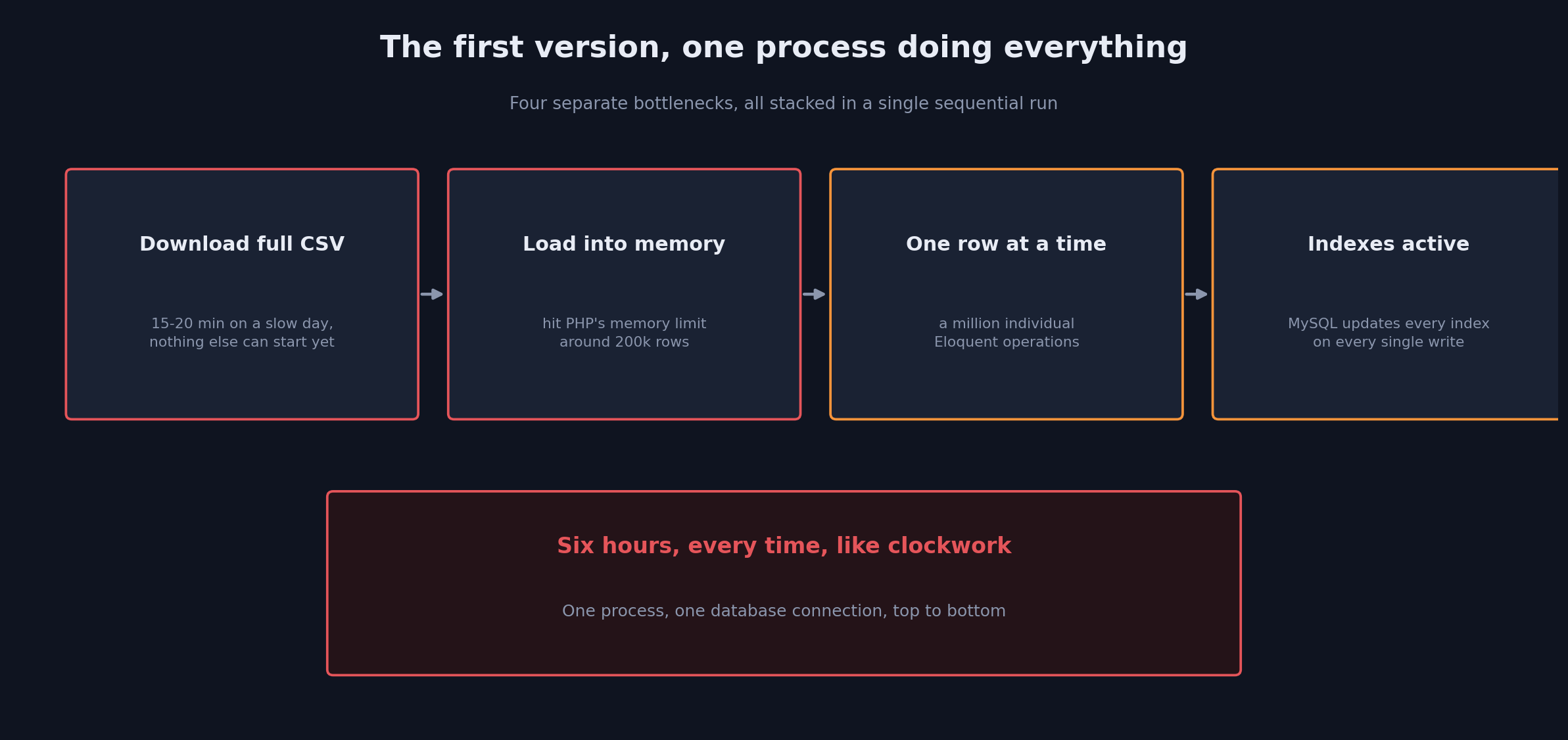
The original import was one artisan command doing everything literally in a straight line: pull the CSV down from S3, parse it row by row, and for each row, find or create the product, update it, save it. No chunking, no queue, just one PHP process talking to one database connection from start to finish. A million rows means a million individual Eloquent calls, and every single one of those is its own trip to the database.
Memory was the first thing to give out, somewhere around 200,000 rows in, because we were loading the whole CSV into an array before we’d even started processing anything. Fine, bump the memory limit, keep going. Except then the database started choking instead; a million INSERT and UPDATE statements with zero transaction batching means MySQL is doing constant fsync work the whole time. And on top of all that, we were downloading the entire file before touching a single row, which on a bad day was 15, 20 minutes gone before any real work had even begun.
Basically everything about it was sequential, everything was blocking on the last thing, and every piece was slow for its own separate reason. Six hours wasn’t one bottleneck; it was four or five of them all standing in line waiting their turn.
Stopping to actually look at what we had
The first real decision here wasn’t a line of code; it was admitting the import wasn’t one job, it was three stitched together: get the data off S3 into something usable, transform and validate a million rows of it, then write all of that to the database without falling over. Each of those has a completely different bottleneck. Cram them into one process, and whichever one’s slowest is the one setting the pace for everyone else.
The command we run didn’t change, still just php artisan import:products. What happens once you type that changed almost entirely.
Streaming the file instead of downloading it whole
First fix: stop pulling the entire file down before doing anything with it.
$s3Stream = Storage::disk('s3')->readStream('products/latest.csv');
$csv = Reader::createFromStream($s3Stream);
$csv->setHeaderOffset(0);

$chunk = [];
$chunkSize = 1000;

foreach ($csv->getRecords() as $record) {
    $chunk[] = $record;

    if (count($chunk) === $chunkSize) {
        ProcessProductChunk::dispatch($chunk);
        $chunk = [];
    }
}

if (!empty($chunk)) {
    ProcessProductChunk::dispatch($chunk);
}
Now the command itself finishes in a couple minutes; all it’s doing is reading a stream and firing off jobs as it goes. All the actual work moved to the background where it belongs.
We landed on 1,000 rows per chunk after actually testing a few sizes, not just picking a round number. Go too small, and you’re paying queue overhead on a mountain of tiny jobs. Go too big and one failed job means redoing a real chunk of work. A thousand rows worked out to just over a thousand jobs total for a full run, each one wrapping up in under 30 seconds.
Batching the database writes
Inside each job, this is what we had originally:
foreach ($records as $record) {
    Product::updateOrCreate(
        ['sku' => $record['sku']],
        $this->mapAttributes($record)
    );
}
updateOrCreate reads nicely, and it’s brutal at this scale, one query per row, a SELECT to see if it’s already there, then an INSERT or an UPDATE depending on the answer. A thousand rows means up to two thousand queries in that one job alone.
We swapped it out for a single upsert instead:
$mapped = array_map(fn($record) => $this->mapAttributes($record), $records);

Product::upsert(
    $mapped,
    ['sku'],                       // unique key to match on
    $this->updatableColumns()      // columns to update if row exists
);
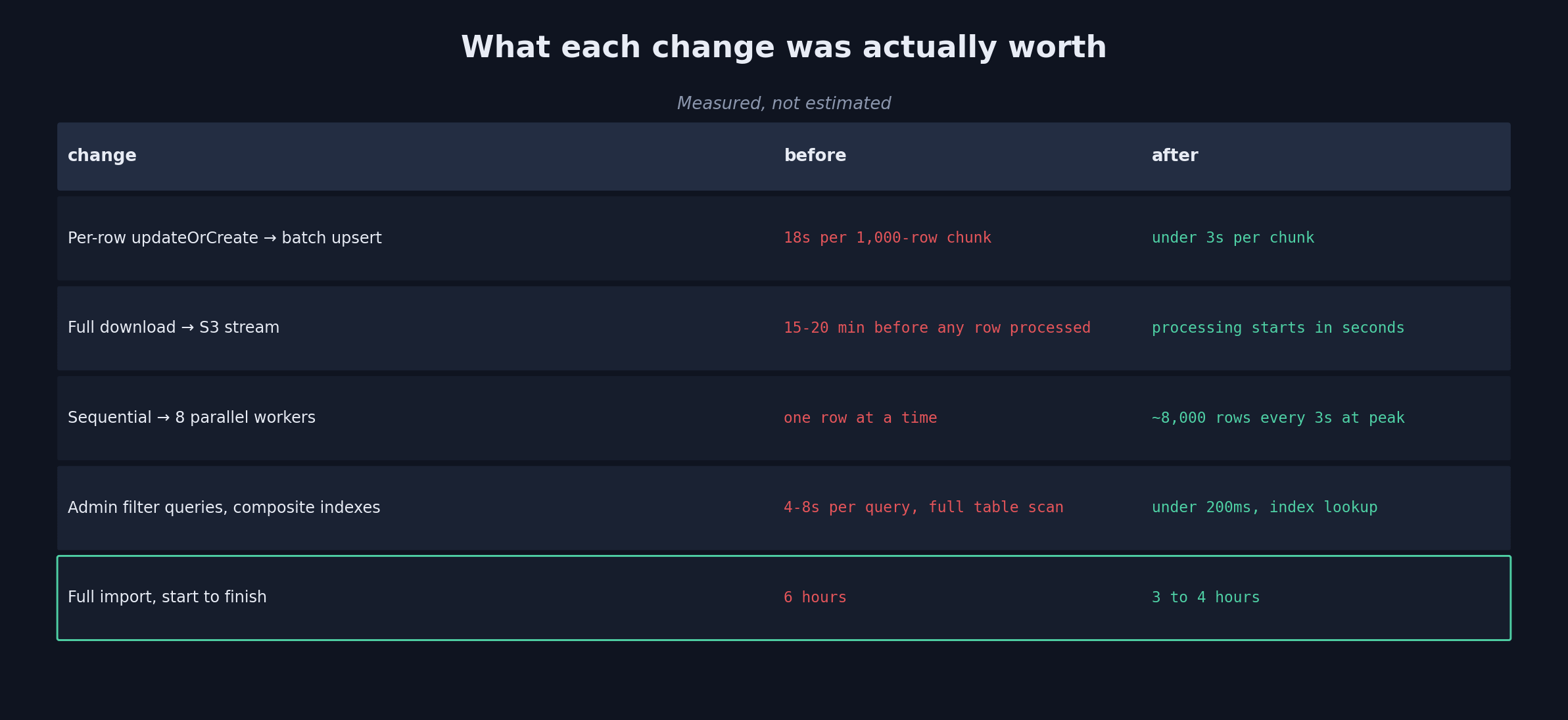
One query, the whole thousand-row batch, done. MySQL sorts out which rows are new and which need updating on its own. In practice, a chunk that used to take 18 seconds dropped to under 3. That one change alone was worth more than we expected going in.
Letting jobs run in parallel
Once everything was chunked and sitting in a queue, running several workers against it at the same time was the obvious next step, and honestly the easiest win of the bunch.
php artisan queue:work redis --queue=product-import --sleep=1 --tries=3 --timeout=120
We keep this on its own dedicated queue, kept away from notifications, PDF generation, and order processing, so a big import run doesn’t end up starving production traffic of worker capacity. We spin up extra workers for the duration of a run and let them wind back down once it’s done.
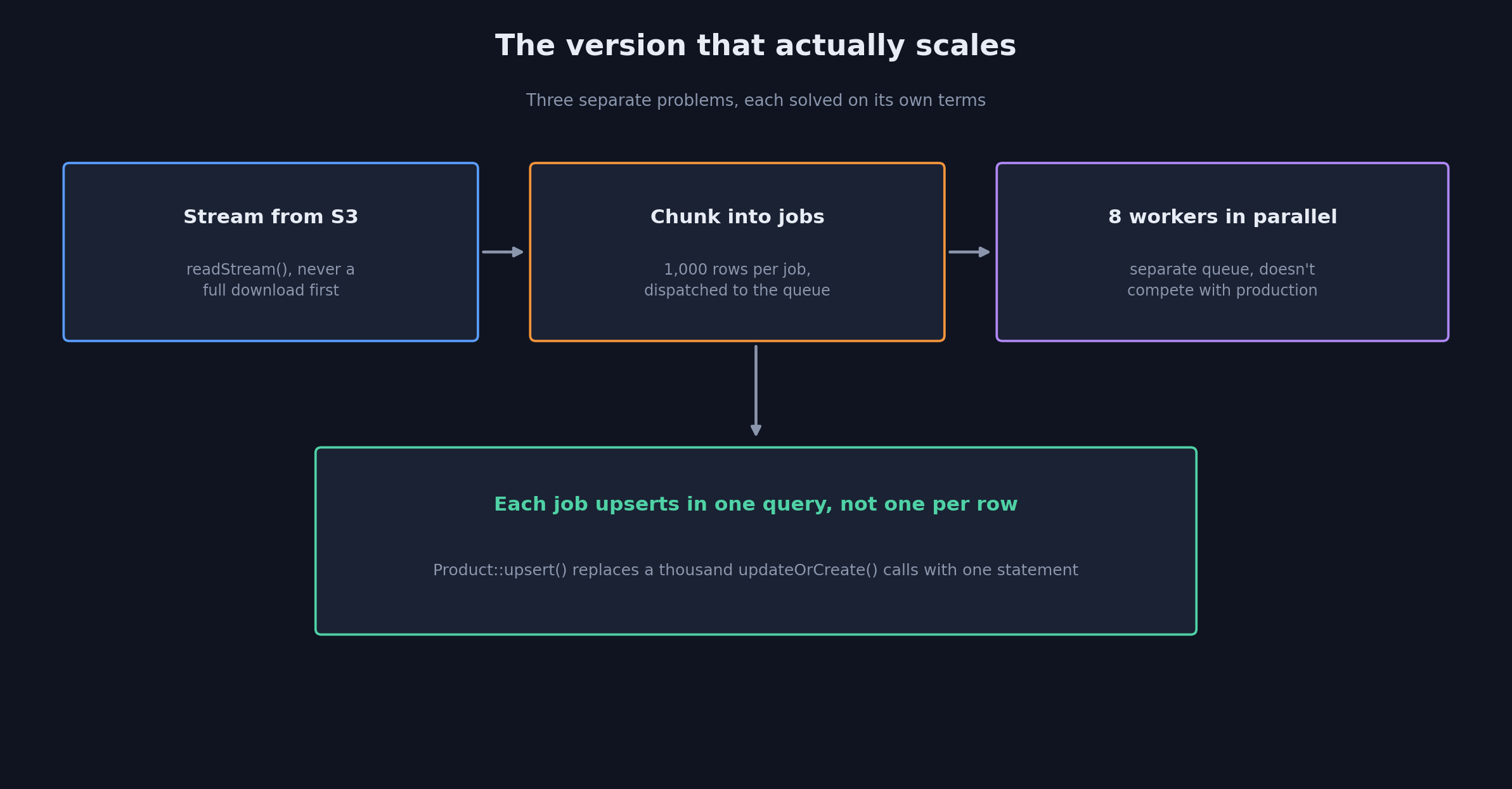
With 8 workers chewing through 1,000-row chunks at once, we’re seeing roughly 8,000 rows every 3 seconds at peak. Same total work, just eight things happening at once instead of one thing happening eight times slower.
Turning off indexes for the big runs
One thing kept hurting us even after the batching fix: indexes. MySQL updates every single index on every write, and with a million rows landing, having all of them active the whole time added a chunk of overhead we didn’t need.
For a full catalog re-import specifically, we disable the non-essential indexes before the run starts and rebuild them right after:
// Before import
DB::statement('ALTER TABLE products DISABLE KEYS');

// ... run the import ...

// After import
DB::statement('ALTER TABLE products ENABLE KEYS');
DB::statement('OPTIMIZE TABLE products');
This is strictly for the full refresh case. Day-to-day incremental updates- a new SKU here, a price change there- still go through with indexes fully active; there’s nowhere near enough volume there to make the tradeoff worth it.
Turns out the admin panel had its own unrelated problem
The admin panel needs to reflect the catalog accurately, filter by cut, carat range, price, availability, search by name, all running through Eloquent. This part wasn’t actually slow because of the import at all; it was just slow on its own. A filter combination against a table with a million rows, using plain where chains, was taking 4 to 8 seconds per query, import running or not.
Fix here was composite indexes that actually lined up with how people were using the filters:
// Migration
Schema::table('products', function (Blueprint $table) {
    $table->index(['status', 'cut', 'carat_weight'], 'idx_admin_filters');
    $table->index(['status', 'price'], 'idx_price_filter');
});
What used to be a full table scan became a plain index lookup. 4 to 8 seconds dropped to under 200 milliseconds. Search stayed a basic LIKE for now, which is fine when the person searching already roughly knows what they’re after; we’re still weighing whether full-text search is worth adding for the customer-facing side.
Where we ended up
The import that used to swallow six hours now wraps up in three to four. What’s left at this point is mostly S3 read speed and the ceiling on queue throughput, both of which we can push further down the road if it ever actually matters, but three to four hours stopped feeling urgent the way six always did.
Looking back at what moved the needle most: streaming instead of downloading killed the file-acquisition wait entirely, chunking into queue jobs is what made parallelizing even possible in the first place, the batch upsert replaced a per-row approach that was never going to hold up at this size, a dedicated queue kept the import out of production’s way, and the composite indexes fixed a problem that had nothing to do with the import but was sitting right next to it the whole time.
The command’s still one line to type. Everything behind it is basically a different piece of software than it was a few months ago.