
Upgrading legacy Laravel and moving millions of rows without taking the site down
A payment processor's deadline forced a framework upgrade and a database restructure at the same time, with no room for downtime

A while back we got the email every team dreads a little: a payment processor we’d been integrated with for years announced they were killing their old API. Not “eventually,” a hard date. Move to their new SDK or lose the integration entirely.
That should’ve been a contained problem. It wasn’t, because the new SDK didn’t just want a different way of calling the same endpoints; it wanted a different shape of data underneath. Customer profiles, payment methods, transaction logs, all of it had been sitting together in one sprawling users table for years, and the new provider needed that split out into proper normalized tables with their own external ID mappings. On top of that, the SDK had quietly dropped support for PHP 7, which meant our Laravel upgrade wasn’t optional anymore either; it was bundled into the same deadline.
So the actual task was: upgrade the framework across several major versions, restructure a production database with millions of rows in it, and do all of that without ever taking the site down. No maintenance window, no “back in an hour” banner. Here’s how that actually went.
A few terms first, in case you need them
Skip ahead if cursors and keyset pagination are already familiar territory.
cursor() and LazyCollection are Laravel’s way of reading a huge result set without loading it all into memory at once. Instead of pulling a million rows into an array and then iterating, you stream them one at a time; memory stays flat no matter how big the table is.
Chunking just means processing a big dataset in smaller batches instead of one giant pass. In this context specifically, it also means turning those batches into background jobs instead of working through them inline.
Keyset pagination (sometimes called chunkById) is a way of paging through a table using where('id', '>', $lastId) instead of skip()->take(). The difference sounds small and turned out to be the single biggest fix in this whole project; more on that below.
Upsert is one statement that inserts a row if it’s new and updates it if it already exists. We leaned on this constantly here because it makes a job safe to retry; if a worker dies halfway through a batch, running it again doesn’t create duplicates or corrupt anything.
Idempotent jobs are jobs that produce the same result no matter how many times they run. When you’ve got background workers processing millions of records, some of them are going to fail or get interrupted, and if your jobs aren’t idempotent, a retry becomes its own bug.
Why we didn’t just write one big migration script
The instinct with something like this is to write a single script, point it at the database, and let it run overnight. We didn’t do that, on purpose. A single blocking ALTER TABLE or a big INSERT INTO ... SELECT on a multi-million row table locks things up, and with live traffic hitting the site the whole time, that’s not a maintenance window; that’s an outage with extra steps.
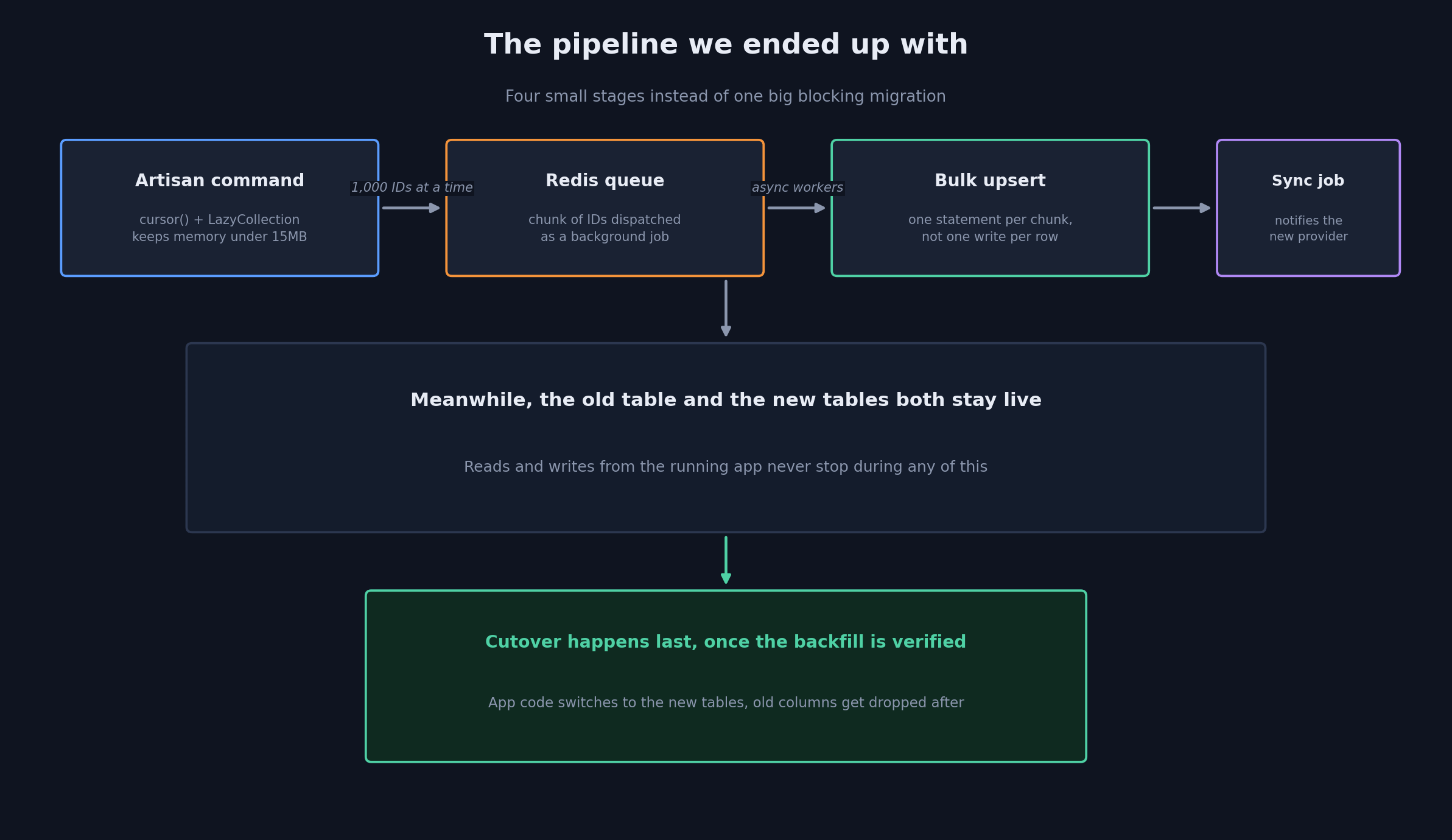
Instead, we broke it into three stages that could each ship and run independently. First, add the new schema alongside the old one, fully non-blocking; nothing depends on it yet. Second, backfill the new tables from the old data in the background, in small pieces, while both schemas stay live simultaneously. Third, once the backfill is verified, flip the application code over to the new tables and only then clean up the old columns.
The first stage was just a normal Laravel migration:
// Phase 1 Migration: non-blocking schema creation for the new provider
Schema::create('user_profiles_v2', function (Blueprint $table) {
    $table->id();
    $table->foreignId('user_id')->constrained()->cascadeOnDelete();
    $table->string('provider_customer_id')->nullable()->index();
    $table->json('preferences')->nullable();
    $table->string('formatted_phone', 32)->index();
    $table->timestamps();
});
Nothing exciting there on purpose; that’s the point: it’s additive, it doesn’t touch anything the running app already depends on.
Streaming the backfill instead of loading it all at once
The obvious way to write the backfill command is to grab all the users that need migrating and loop over them. At a million-plus rows, that’s an instant Allowed memory size exhausted error, and it happens before you’ve even started doing real work.
We built the command around cursor() instead, which streams rows from MySQL rather than buffering them:
namespace App\Console\Commands;

use App\Models\User;
use App\Jobs\MigrateUserProfileChunkJob;
use Illuminate\Console\Command;

class MigrateUserProfilesCommand extends Command
{
    protected $signature = 'data:migrate-profiles';
    protected $description = 'Dispatches async backfill jobs for profile normalization';

    public function handle(): void
    {
        // Unbuffered streaming keeps memory consumption under 15MB
        User::query()
            ->whereNull('migrated_at')
            ->cursor()
            ->chunk(1000)
            ->each(function ($chunk) {
                dispatch(new MigrateUserProfileChunkJob($chunk->pluck('id')->toArray()));
            });
    }
}
That command’s job is small on purpose: read a chunk of IDs, hand them off, move to the next chunk. All the actual transformation work happens somewhere else entirely.
Doing the writes as one upsert instead of a thousand
Each dispatched job picks up its chunk of IDs, builds the new payload, and writes it in a single upsert instead of looping through records one at a time:
namespace App\Jobs;

use App\Models\User;
use App\Models\UserProfileV2;
use App\Helpers\PhoneHelper;
use Illuminate\Bus\Queueable;
use Illuminate\Contracts\Queue\ShouldQueue;
use Illuminate\Foundation\Bus\Dispatchable;
use Illuminate\Queue\InteractsWithQueue;
use Illuminate\Queue\SerializesModels;

class MigrateUserProfileChunkJob implements ShouldQueue
{
    use Dispatchable, InteractsWithQueue, Queueable, SerializesModels;

    public function __construct(public array $userIds) {}

    public function handle(): void
    {
        $payload = User::whereIn('id', $this->userIds)
            ->get()
            ->map(fn ($user) => [
                'user_id'         => $user->id,
                'preferences'     => json_encode($user->legacy_preferences),
                'formatted_phone' => PhoneHelper::sanitize($user->phone),
                'created_at'      => $user->created_at,
                'updated_at'      => now(),
            ])
            ->toArray();

        UserProfileV2::upsert(
            $payload,
            ['user_id'],
            ['preferences', 'formatted_phone', 'updated_at']
        );
    }
}
The upsert is doing double duty here; it’s fast, and it’s what makes the whole pipeline safe to retry. If this job dies for any reason and Laravel’s queue retries it, running the same upsert again just overwrites the same rows with the same values. No duplicates, no corrupted state, nothing to clean up by hand.
Three things that only showed up once we were actually at scale
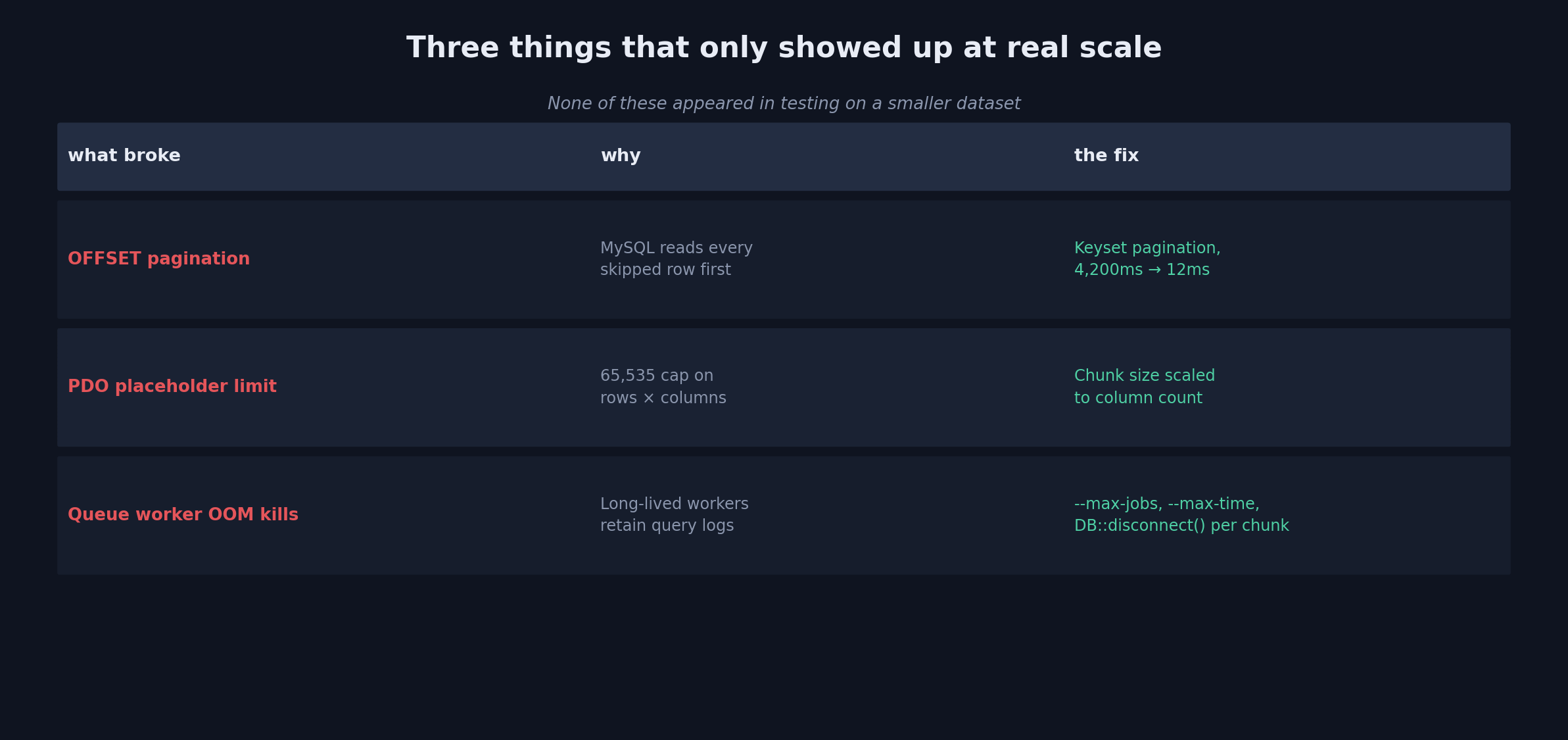
Testing on a smaller slice of the data, everything looked fine. Running it against the real dataset, we hit three separate problems that never would have shown up any earlier.
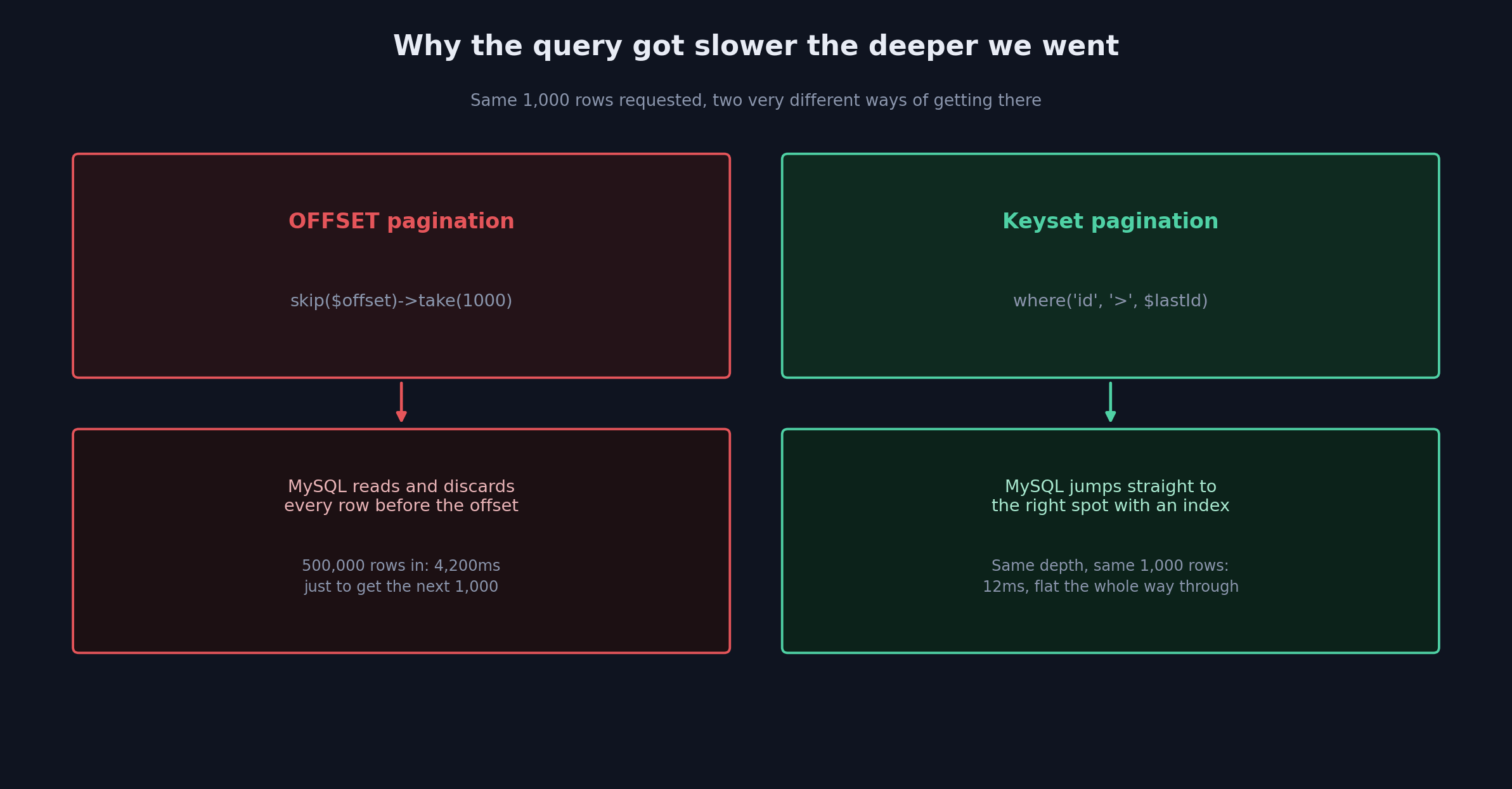
The first was pagination. Our early version used plain skip($offset)->take(1000), and it was fast for the first few batches and then got progressively, painfully slower the deeper into the table we went. At an offset of 500,000, a single batch was taking over 4 seconds. The reason is almost embarrassingly simple once you know it: MySQL has to actually read and discard every row before your offset just to figure out where to start counting. Half a million rows in, that’s half a million rows read and thrown away, every single batch. Switching to keyset pagination, where('id', '>', $lastProcessedId) instead of an offset, fixed it completely. Query time went from 4,200 milliseconds down to 12, and it stayed at 12 no matter how deep into the table we were. This one change was worth more than everything else in this post combined.
The second was a limit we didn’t know existed until we hit it. Once we started upserting rows with more than 30 columns, PHP started throwing PDOException: SQLSTATE[HY000]: General error: 1390 Prepared statement contains too many placeholders. Turns out MySQL’s PDO driver caps prepared statements at 65,535 placeholders total, and that number is rows times columns, not just rows. A chunk size that worked fine for a narrow table could blow straight through that ceiling on a wider one. The fix was to stop hardcoding chunk size and calculate it from the column count instead; max chunk size is just 65,535 divided by however many columns you’re writing, rounded down.
The third took longer to notice because it built up slowly. Our queue workers, left running for hours against millions of records, were gradually eating all the server’s memory until Linux started killing processes outright. Long-lived queue:work processes hang onto query logs, event listeners, and cached Eloquent state across every single job they process, and none of that gets cleared automatically. We fixed it with worker lifecycle limits, --max-jobs=1000 --max-time=3600 so workers recycle themselves periodically, plus an explicit DB::disconnect() at the end of every chunk to force the connection to actually let go of what it was holding.
What we’d tell ourselves if we were starting this over
Write every migration job assuming it’s going to fail partway through, because at this scale, something eventually will. Upsert instead of insert, always; it’s what makes a retry safe instead of dangerous.
Never load a big Eloquent collection in one step if there’s any chance it grows past a few thousand rows. cursor(), chunkById(), raw streaming, whichever fits, but something that doesn’t try to hold the whole thing in memory at once.
And keep deployment separate from schema change. Add the new stuff first, without touching anything live. Backfill in the background, on its own schedule, with room to pause or retry. Only once that’s actually verified do you flip the application over, and only after that do you touch the old columns. Doing all three of those at once is how a routine migration turns into an incident.
None of this needed a third-party ETL platform or any SaaS migration tool. Artisan commands, queue workers, and Laravel’s own collection primitives were enough to move millions of rows through a live production database without anyone outside the team ever noticing it happened.